Identifying When to Replace Ethernet Cable: Practical Signs and Reasons
Introduction
When it comes to network installations, the cabling often lasts as long as the building itself. In practice, if you choose a new Ethernet cable and install it correctly, you can expect it to work for the life of the network without needing a replacement. However, having spent years running cables and troubleshooting issues, I can tell you that there comes a point when the old cable just can't cut it anymore. Whether it's physical damage or simply being outdated for new equipment, replacing Ethernet cable is sometimes unavoidable.
Common Signs of Bad Ethernet Cable
There are a few clear signals that your current cable isn't doing its job anymore.
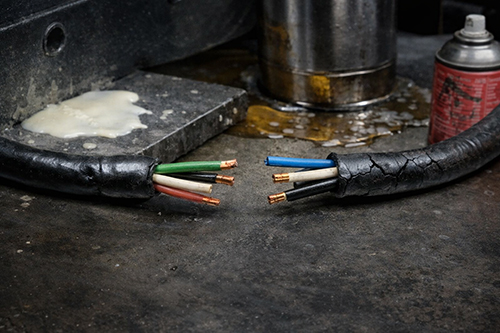
First of all, physical damage is a big warning sign. When you're out in the field, especially in outdoor installations, cables often get nicked, chewed, or otherwise damaged. When you come across a cable with visible wear or cuts in the jacket, I know it's time to swap it out.
Next, consider whether the cable meets modern specifications. Over the years, network speeds have jumped from 100 Megabits per second to a gigabit and beyond. If the cabling was installed before these speeds became common, it may now be a bottleneck. Upgrading to faster switches and routers means your old cable might not be able to support the new bandwidth, which can lead to frustrating drops and slow connections.
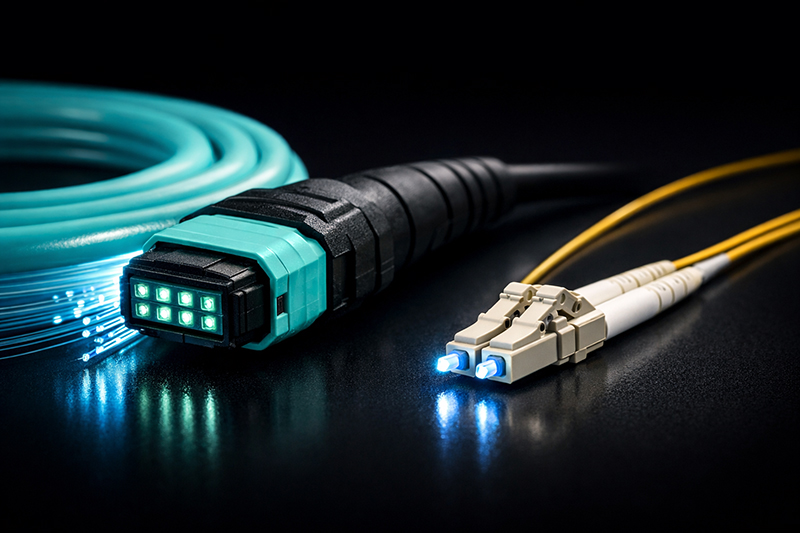
Another sign to watch for is physical degradation in harsh environments. Indoor cables that have been exposed to outdoor conditions or moisture can deteriorate quickly. For instance, if an indoor-rated cable has been left exposed to rain or direct sunlight, it generally fails in just a few months. You might also encounter trouble when a move from Ethernet over copper to Ethernet over fiber optics is underway, as the old cable will simply not perform the same role.

Reasons to Replace Ethernet Cable
So, if you spot one of these signs, does that mean every single cable in your building must go? Not always. There are several scenarios when a complete overhaul is necessary, but sometimes replacing only certain runs is sufficient.
One important reason for full replacement is when upgrading from one network speed to another. For example, if you're switching from one gigabit equipment to ten gigabit hardware and your current cables are Category 5e or Category 6, they might fall short, especially on longer runs. For runs exceeding 165 feet (55 meters), it is practical to install Category 6A cable to handle the higher speeds confidently.
Old Category 5 cables also pose a problem. Although these cables can officially support speeds up to 100 Megabits per second over a distance of 328 feet (100 meters), modern network demands usually require at least 1 Gigabit per second performance. Over time, the network equipment you rely on will evolve, making the older standards obsolete and leading to a finger-pointing fest when connectivity starts to wobble.
Outdoor installations bring another dimension. If the cable isn't rated for outside use, it's very likely to be compromised by moisture and ultraviolet light. Outside Plant cables are built with jackets like LLDPE or HDPE, which resist these elements. Without those features, you're just asking for intermittent failures and potential safety hazards.
Sometimes a building remodel is the perfect opportunity to reassess. When inspectors come in and expect proper jacket ratings, such as plenum-rated cable in certain entry points or riser-rated in others, you might be forced to replace cables that don't meet current building codes. This isn't just a legal requirement; it's important for the reliability and safety of the installation.
There are also issues with certain types of cables like copper clad aluminum cables. They have a reputation for unexpected terminations failures and conductor breakage inside walls, leading to hard-to-trace connectivity issues. Another pitfall is using stranded copper Ethernet patch cables in structured cabling runs. While patch cables are great for quick, short connections (say, from a wall jack to a desktop computer), they are not meant for long, permanent installation setups. The extra resistance from stranded cores can lead to power over Ethernet problems and unstable data connections over longer distances.
When Replacement Isn't Necessary
Not every run of cable needs to be replaced, even if it isn't new. For example, if you have a Category 6 cable installed in the right environment and the run length is within a manageable distance (not exceeding 55 meters or 165 feet), you might still achieve 10 Gigabit Ethernet speeds without upgrading to Category 6A. In practice, this can work perfectly fine as long as the installation conditions match the cable's specifications.
Another scenario is when the equipment connected to the cable does not require high speeds. In some industrial facilities, machines like punch presses or injection molding presses communicate at speeds no higher than 100 Megabits per second. With production equipment costing millions of dollars and wired to a very specific standard, there is little incentive to upgrade the cabling if the performance level remains fixed. In these cases, leaving the old cable in place is a cost-effective solution.
Can Ethernet cables go bad?
It is a common misconception that Ethernet cables merely wear out suddenly. In reality, wiring tends to fail gradually over many years. Much like old electrical wiring, which can become brittle after decades, Ethernet cable components deteriorate slowly. The copper within the cable might eventually lose its excellent conductivity, and the plastic jacket made from PVC might "off-gas" over time, losing its protective properties. You really begin to see these effects only when you're dealing with cables that have been in place for several decades—usually Category 3 or early Category 5 installations. Under ideal conditions, modern Ethernet cables are built to last, but poor environmental factors can accelerate the aging process.
Read more: Cat5/5e, Cat6/6a, Cat7, and Cat8 Ethernet Cables
Tips to Avoid Common Mistakes When Replacing Ethernet Cables
Replacing network cabling can turn into a real headache if you are not careful. A common mistake is accidentally cutting the wrong cable run. Always double-check which cable connects to which device or port before you start snipping away. I learned this the hard way early on in my career, and now I always mark cables clearly before starting any work.
Another tip is to ensure that the cable is fully disconnected, both at the switch and device ends, before cutting. There was one incident where I cut a line still powered by Power over Ethernet. Luckily, the voltage is low, but it ended up frying a switch port. Such mishaps can be avoided by following a disciplined shutdown procedure.
If your project involves the removal of optical fiber cables, be extra cautious. Cutting fiber cables can release tiny shards of glass-like material into the air. These particles are nearly invisible but pose a serious health and safety risk. Using proper fiber handling tools and techniques is a must if fiber optic cabling is part of the job.
Pay attention to cable jacket ratings while working on building remodels. Sometimes, during construction, inspectors will catch you out if you use the wrong type of cable for a particular location. If you're replacing cable in an HVAC space or through a plenum, make sure you're using the correct type. Proper planning and up-front verification with material suppliers—like Stanford Optics, known for reliable materials—go a long way in preventing costly mistakes.
Final Thoughts
At the end of the day, Ethernet cable is just one part of a much larger system. Every component must work together seamlessly. When the cable stops doing its job properly, whether due to physical damage, outdated specifications, or environmental exposure, the entire network can falter. Though it might seem like replacing cable is a hassle, delaying the upgrade can lead to bigger headaches down the road.
Practical installation and regular inspections can keep your network running smoothly. By paying attention to the signs and using cautious techniques during replacement, you avoid unnecessary downtime and costly repairs. In practice, keeping pace with modern network demands often means staying ahead of cable degradation and incompatibility. Whether you decide to upgrade an entire system or just replace certain runs, always remember that the cable is only as strong as its weakest link.